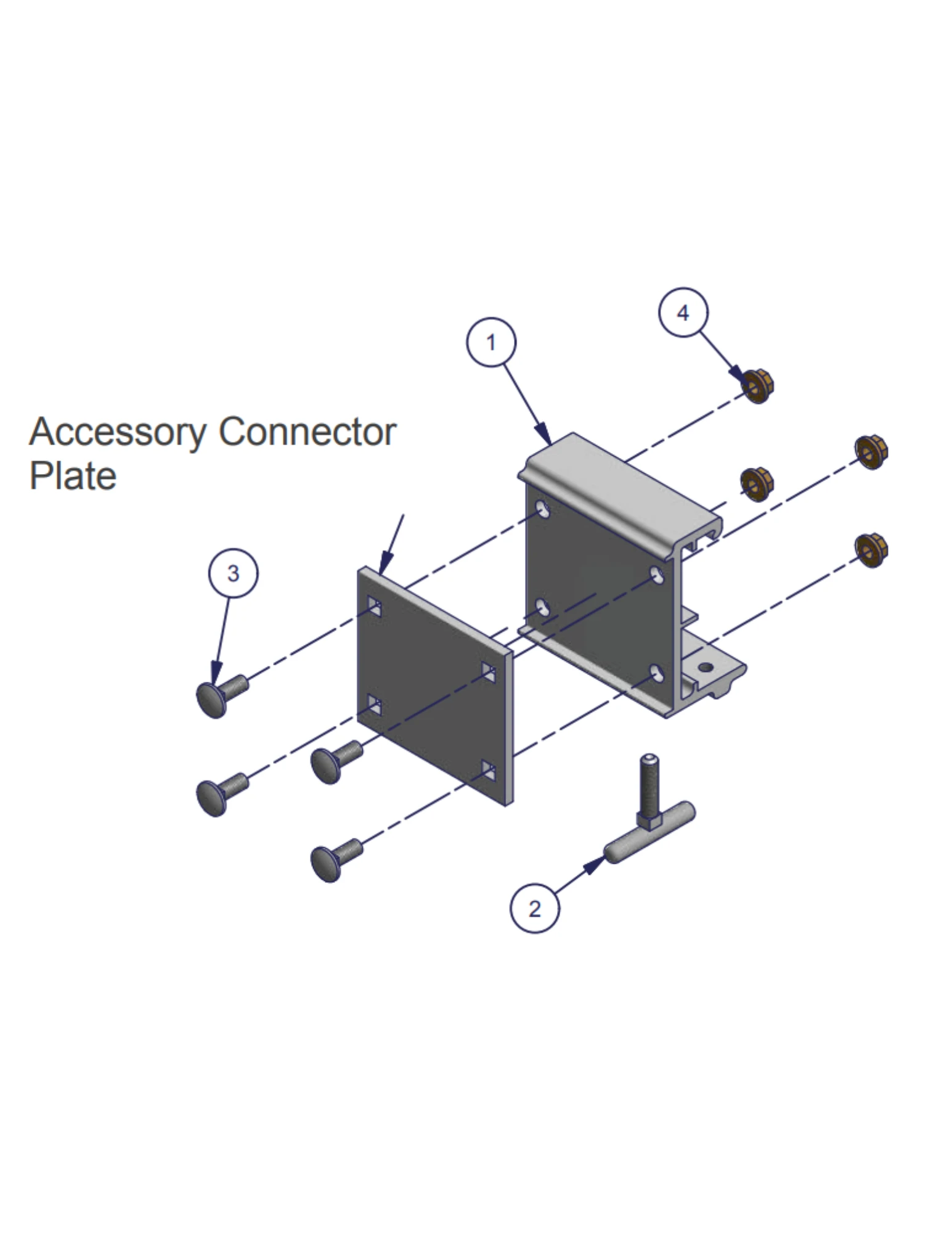


The ShoreMaster InfinityTrack Accessory Dock Bracket—formerly called the QC Accessory Bracket—connects compatible accessories to the side rail of an Infinity dock. The bracket first bolts to the accessory’s welded connector plate. Its upper lip then hooks into the top dock rail, and a hand-tightened T-handle secures the lower connection. This lets many accessories be installed, removed or repositioned without drilling permanent holes in the dock frame.
The Foundation of the InfinityTrack Accessory System
No Drilling into the Dock Rail
The bracket engages the built-in InfinityTrack profile rather than requiring permanent holes through the ShoreMaster side frame.
Reposition Accessories as Needs Change
Loosen the T-handle, move the compatible accessory along the rail and retighten it in a clear, supported location.
Matched to Each Dock Series
RS4, RS7 and TS9/FTS9 use different bracket geometries. Selecting the exact dock model is essential.
Used Across Many Accessories
Depending on the product, one, two or three brackets may be required for ladders, steps, bumpers, furniture, racks and other add-ons.
Select the Bracket by Dock Frame
The three options fit different InfinityTrack rail profiles. Check the dock model before ordering and do not substitute one version for another.
Infinity RS4
Part 1006706
- For the RS4 dock-frame rail profile.
- Includes one RS4 connector bracket, T-handle and mounting hardware.
- Follow the accessory instructions for quantity and position.
Infinity RS7
Part 1006708
- For the RS7 dock-frame rail profile.
- Hooks into the top groove and tightens against the lower track.
- Avoid the frame access holes when positioning the T-handle.
Infinity TS9 / FTS9
Part 1006730
- For TS9 and compatible FTS9 InfinityTrack frames.
- Uses the system-specific TS9 connector shape and supplied hardware.
- Confirm the dock section is properly supported for the accessory load.
Bracket Selection at a Glance
How the Bracket Installs
- Attach the bracket to the accessory plate. Use the supplied carriage bolts and nuts at the welded connector plate on the compatible accessory.
- Hook the upper lip into the dock rail. Place the top of the bracket into the upper InfinityTrack groove.
- Pivot the bracket down. Align the lower portion with the track at the bottom of the dock frame.
- Tighten the T-handle. Secure the accessory in the desired position while avoiding the dock-frame access holes.
What Is Included
Included with One Selected Bracket
- One RS4, RS7 or TS9/FTS9 accessory connector bracket
- One standard T-handle
- Carriage bolts and nuts for attaching the bracket to the accessory connector plate
- System-specific hardware shown in the official bracket instructions
Confirm Before Ordering
- The dock model and rail profile
- The number of brackets required by the accessory
- That the accessory has the compatible welded connector plate
- Adequate dock support and clearance at the planned location
Brackets Are Sold Individually
Many accessories require two brackets, while smaller accessories may use one and some long accessories may use three. Check the product description or installation instructions and set the order quantity accordingly.
The Quick Steps stair system uses its own dedicated Quick Steps Bracket and should not be mounted with standard InfinityTrack Accessory Dock Brackets.
Common Products That Use InfinityTrack Brackets
Pivoting Dock Ladder: requires two matching brackets for a ShoreMaster Infinity installation.
Dock Steps with Handrail: requires two matching brackets. Many bumpers, racks, furniture pieces and smaller accessories use one or more based on their individual instructions.
Frequently Asked Questions
Are InfinityTrack brackets sold individually?
Yes. This listing provides one selected bracket. Order the quantity required by the accessory installation instructions.
Can I use an RS4 bracket on an RS7 or TS9 dock?
No. Each dock series has a different rail profile and its own part number. Select 1006706 for RS4, 1006708 for RS7 or 1006730 for TS9/FTS9.
Why do older instructions call this a QC Accessory Bracket?
QC was the earlier name used for the same quick-connect accessory concept. Current product naming uses InfinityTrack Accessory Dock Bracket, but older manuals and parts lists may still say QC.
How many brackets does a Pivoting Dock Ladder need?
A ShoreMaster Infinity installation requires two matching brackets, one for each side of the ladder assembly.
Can I move the accessory after it is installed?
Yes. Loosen the T-handle, reposition the compatible accessory along the dock rail and retighten it in a supported location. Remove or support heavy accessories before sliding them.
Need Help Matching the Bracket to Your Dock?
Call with a side-view photo of the dock frame, the dock model and the accessory being installed. We can help confirm the bracket part number and quantity to review.
Call 888-298-970211 Reviews
-
easy to install
always get the right product for the job and installation is easy
-
Worked Perfectly!!!
Shoremaster manufacturs quality products
-
Versatile bracket for many applications
Received exactly I ordered
-
Easy Setup
The bracket system with bumper is easy to assemble and install.
-
Infinity Track Bracket
Genius, it makes installation and the ability to move and customize your docks simple and easy.
-
Bracket looks very strong and easy to use
Would buy again
-
Infinity Track Accessories
Good but spendy
-
Infinity track bracket
Works well with my battery box for my boat lift.
-
The Best
All of their products are designed in excellence and the best value out there.....No doubt....
-
Infinity track accessory bracket
Great price, came quick, and fits! I'm not a robot
-
Outstanding design
Ease of installation and use amazing. Thanks